
Cell Density Calculator — Hemocytometer Cell Counting & Viability
A cell density calculator converts the cells you count on a hemocytometer into the concentration of cells in your original suspension, expressed as cells per millilitre. The core rule is cells/mL = average count per large square × dilution factor × 104, because each large square holds a volume of 0.1 µL (10−4 mL). For viability you also distinguish live from dead cells using trypan blue exclusion, and for seeding and dilution you scale the density to whatever volume or well format your experiment needs. Enter your counts below and the calculator returns the exact density, viability, and seeding values, with every step shown.
Key facts at a glance
- Hemocytometer formula: cells/mL = (average cells per large square) × dilution factor × 104.
- The 104 factor: each large square is 1 mm × 1 mm × 0.1 mm depth = 0.1 µL = 10−4 mL.
- Viability: % viable = live cells ÷ (live + dead) × 100, using trypan blue to mark dead cells.
- Count enough squares: count at least 4 large squares (both chambers) for a reliable average.
- Dilution factor: if you mix cell suspension 1:1 with trypan blue, the dilution factor is 2.
📋 Table of Contents
▼
- What a Cell Density Calculator Does
- Cell Density Calculator — Five Modes
- How Cell Density Is Calculated
- Real Scenarios Where Cell Density Math Mattered
- Common Cell Counting Mistakes
- Aseptic & Biosafety Essentials
- Which Mode Fits Your Situation
- Frequently Asked Questions
- Cell Density Best Practices Checklist
- Trusted Reference Resources
- User Reviews & Ratings
What a Cell Density Calculator Does
A cell density calculator tells you exactly how many cells are in each millilitre of your suspension, based on the cells you count under a microscope on a hemocytometer. It eliminates the arithmetic errors that creep in when you are juggling square counts, dilution factors, the mysterious 104 multiplier, viability stains, and the conversion to total cell numbers or seeding densities. In cell culture, stem-cell work, drug screening, microbiology, and clinical hematology, getting this number right is the single most important step before any downstream experiment, because every dilution, every plating decision, and every dose calculation traces back to it.
The reason hemocytometer math trips people up is not the biology; it is the layered bookkeeping. You must average the cells across several large squares so that random distribution does not skew the result, multiply by the dilution factor to undo any dilution you created when you added trypan blue or buffer, and then multiply by 104 to convert from the tiny volume of one square (0.1 microlitres) into cells per millilitre. On top of that, viability staining adds another layer: you need to separate live from dead cells, and each of those counts generates its own density. Then, if you are seeding plates, you must work backwards from a desired number of cells per well to figure out how much suspension to pipette. It is a lot of moving parts, and a single misplaced factor — forgetting the dilution, using 103 instead of 104, or counting only one square — can throw the final number off by an order of magnitude.
This calculator handles the five most common cell-density tasks in one place: the hemocytometer cell-density solver, the cell-viability calculator with live/dead separation, the total-cell-number converter, the seeding-density planner for plates and flasks, and the dilution-to-target solver for adjusting a suspension to a desired concentration. Each mode shows the answer and every step of the working, so you can verify the reasoning, spot an error, and learn the method rather than blindly trusting a black box. Whether you are a first-year graduate student counting your very first hemocytometer or a seasoned research scientist running a high-throughput drug screen, the goal is the same: a defensible, reproducible cell number that your experiment can rely on.
Because cell density and dilution share the same underlying conservation principles, the tools in the sidebar — including our cell dilution calculator and dilution factor calculator — are useful companions for any cell-culture concentration task.
Cell Density Calculator
Five modes — hemocytometer density, viability, total cells, seeding & dilution
Calculation Result
⚠️ Safety first: Handle all cell lines under the appropriate biosafety level (BSL-1 or BSL-2). Use aseptic technique in a biosafety cabinet, wear PPE, and decontaminate all waste by autoclaving before disposal.
How Cell Density Is Calculated
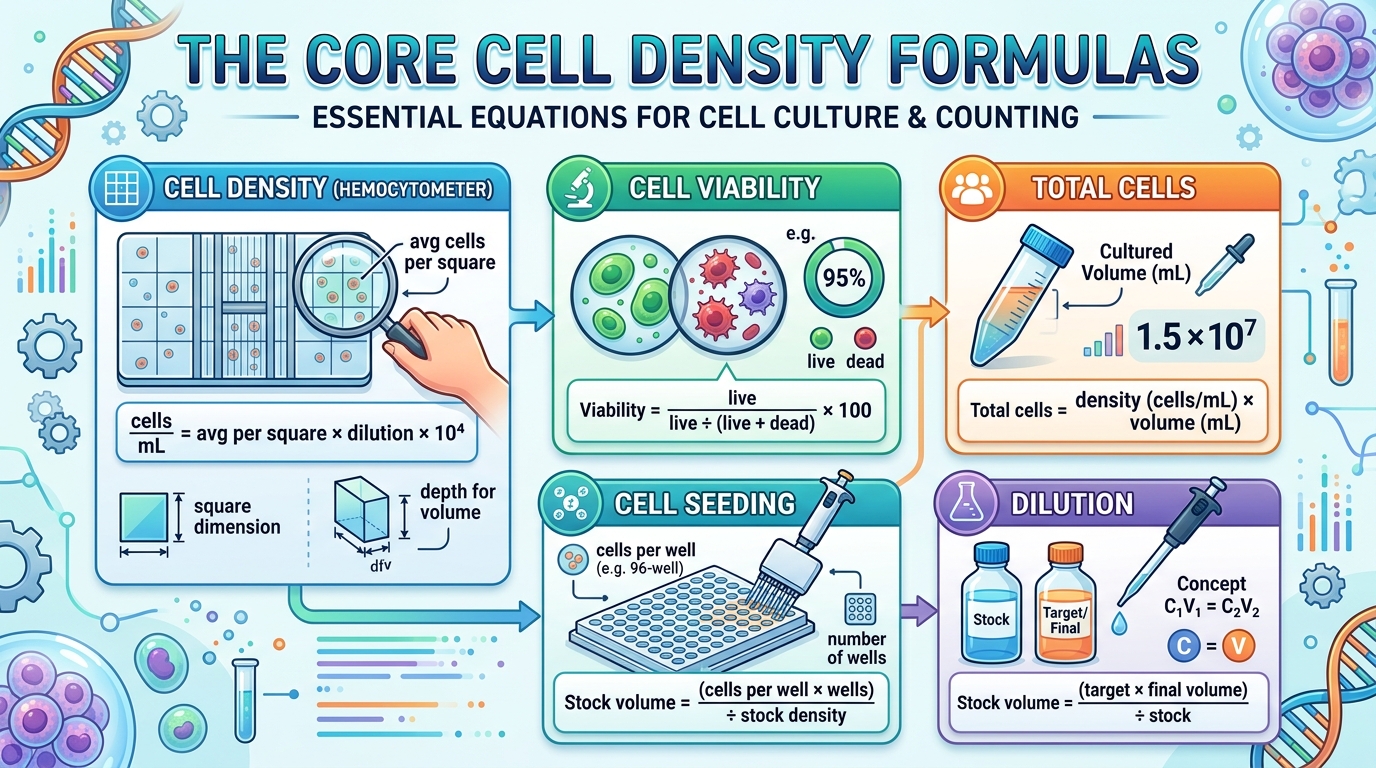
Every cell-density calculation comes down to one idea: the hemocytometer gives you a known, tiny volume, and you scale the count in that volume up to cells per millilitre. The counting chamber is precisely engineered so that each large square on the grid encloses a volume of exactly 0.1 microlitres (1 mm × 1 mm area, 0.1 mm depth). Because 0.1 µL equals 10−4 mL, multiplying the average count per square by 104 converts it directly to cells per millilitre. Everything else — the dilution factor, viability, total cells, seeding, and target dilution — builds on that single conversion.
The Hemocytometer Grid Explained
Before diving into the formulas, it helps to understand the physical device. A standard improved Neubauer hemocytometer consists of two counting chambers, one on each side of a central groove. Each chamber is loaded with approximately 10 µL of cell suspension, which spreads under a special coverslip to a uniform depth of exactly 0.1 mm. The grid etched into the glass beneath contains nine large squares, each measuring 1 mm × 1 mm. The central large square is further subdivided into 25 medium squares, each of which contains 16 small squares — giving 400 small squares total. For most mammalian cell counting, you count cells within the four corner large squares plus the centre square (or a subset of at least four). Cells resting on the top and left boundary lines of a square are counted; those on the bottom and right are excluded, to avoid double-counting. This consistent edge rule matters because it removes subjectivity and keeps the count reproducible from one person to the next.
1. Hemocytometer Cell Density (cells/mL)
Count the cells in several large squares (ideally four from both chambers), average them, multiply by the dilution factor, and then by 104: cells/mL = average count per square × dilution factor × 104. For example, if you counted 45, 52, 48, and 50 cells in four squares (average = 48.75), diluted 1:1 with trypan blue (factor 2), the density is 48.75 × 2 × 10,000 = 975,000 cells/mL. This is the foundational calculation from which all others derive. If you are only doing a simple viability check without trypan blue, the dilution factor is 1 (undiluted), but you still apply the 104 multiplier to convert from the 0.1 µL square volume to cells per millilitre. Always record which squares you counted and their individual values, not just the average, so you can detect outliers and repeat the count if one square is wildly different from the others.
2. Cell Viability (trypan blue exclusion)
Trypan blue is a dye that only enters cells with damaged membranes — dead cells stain blue, while live cells with intact membranes exclude it and appear bright and refractile. To calculate viability: % viability = live cells ÷ (live + dead cells) × 100. If you counted 180 live and 20 dead cells, viability = 180 ÷ 200 × 100 = 90%. The live cell density is then calculated from the live counts alone: avg live per square × dilution × 104.
3. Total Cell Number
Once you know the density, the total number of cells in your sample is straightforward: total cells = density (cells/mL) × volume (mL). A suspension of 500,000 cells/mL in a 10 mL flask contains 5,000,000 cells total. This is what you need when deciding whether you have enough cells for an experiment, or when splitting cultures at a defined ratio.
Total cells = density × volume (mL)
Seeding: stock volume = (cells per well × wells) ÷ stock density
Dilution: C₁V₁ = C₂V₂ — stock volume = (target × final vol) ÷ stock
4. Seeding Density for Plates and Flasks
When you need to seed a specific number of cells into each well of a multi-well plate, you work backwards from the desired density. Total cells needed = cells per well × number of wells. Then divide by your stock suspension density to find how much to pipette: stock volume = total cells needed ÷ stock density. For 10,000 cells per well across a 96-well plate from a 500,000 cells/mL stock: (10,000 × 96) ÷ 500,000 = 1.92 mL of stock, which is 20 µL per well.
5. Dilution to a Target Density
If your stock is more concentrated than you need, dilute it using C₁V₁ = C₂V₂. Solve for the stock volume: stock volume = (target density × final volume) ÷ stock density, and the diluent is the remainder. To make 10 mL at 500,000 cells/mL from a 2,000,000 cells/mL stock: (500,000 × 10) ÷ 2,000,000 = 2.5 mL of stock, plus 7.5 mL of diluent.
Quick Reference Values
Remember: Average at least four large squares for a reliable result, always account for the dilution factor when you mixed with trypan blue or buffer, and use the 104 multiplier to convert from the 0.1 µL square volume to cells per mL. If your counts vary wildly between squares, the suspension may be clumpy or poorly mixed — re-mix and recount.
Real Scenarios Where Cell Density Math Mattered
These five scenarios reflect real situations in cell-culture labs, drug-screening facilities, and clinical research where the cell-density arithmetic — or a missing step — made a tangible difference to the experiment.
Scenario 1: The Forgotten Dilution Factor
A graduate student counted 50 cells per square and reported 500,000 cells/mL, forgetting that she had mixed the suspension 1:1 with trypan blue. The actual density was 50 × 2 × 10,000 = 1,000,000 cells/mL — double what she reported. She seeded half the intended cells per well, and the experiment took twice as long to reach confluency, delaying results by a full week. The Density mode forces the dilution-factor input so this cannot be skipped.
Scenario 2: Counting Only One Square
A technician counted 55 cells in a single square and used that directly. The next day, counting four squares on the same sample, she got 40, 62, 38, and 51 — an average of 47.75, nearly 15% lower than her single count. A single square is subject to random distribution error; counting at least four averages it out. The Density mode prompts for multiple squares and averages them automatically.
Scenario 3: Seeding an Entire 96-Well Plate
A researcher needed 5,000 cells per well in a 96-well plate, plus 10% overage for pipetting loss, from a stock at 800,000 cells/mL. The total is 5,000 × 96 × 1.1 = 528,000 cells, requiring 528,000 ÷ 800,000 = 0.66 mL of stock, diluted to a total working volume (e.g., 10 mL) for even pipetting. The Seeding mode handles this in seconds, including the volume per well in microlitres.
Scenario 4: A Viability Drop After Thawing
A lab thawed a vial of cryopreserved cells and counted with trypan blue: 120 live, 80 dead out of 200 total — only 60% viability. At that viability, seeding the “nominal” density would have included too many dead cells, confounding the assay. The Viability mode separated live from total density, so the researcher seeded based on live cells only, producing a healthier culture.
Scenario 5: Diluting for a Flow Cytometry Assay
A stock at 4,000,000 cells/mL needed to be at 1,000,000 cells/mL for a flow cytometer, in a total of 5 mL. Using C₁V₁ = C₂V₂: stock volume = (1,000,000 × 5) ÷ 4,000,000 = 1.25 mL, plus 3.75 mL of buffer. The Dilute mode returned both volumes instantly, preventing the all-too-common error of adding too much stock.

Common Cell Counting Mistakes
The errors people make with hemocytometer counting cluster around a few predictable points. Understanding why they happen prevents them.
Mistake 1: Forgetting the Dilution Factor
If you mixed your suspension 1:1 with trypan blue, the dilution factor is 2. Forgetting this halves your reported density. Always enter the dilution factor — the Density and Viability modes require it explicitly.
Mistake 2: Using 103 Instead of 104
Each large square holds 0.1 µL = 10−4 mL, so the multiplier is 104, not 103. Using 103 gives a result ten times too low. The calculator applies 104 automatically so you never have to remember.
Mistake 3: Counting Too Few Squares
A single square is unreliable because cells distribute unevenly. Counting at least four large squares (from both chambers) gives a representative average. Fewer than four inflates variability.
Mistake 4: Ignoring Cell Clumping
Clumped cells are hard to count and bias the result downward (a clump of five cells may be counted as one). Always trypanize or pipette vigorously to create a single-cell suspension before loading the hemocytometer.
Mistake 5: Letting Trypan Blue Sit Too Long
Trypan blue begins to enter viable cells over time (usually after 3–5 minutes), making live cells falsely appear dead. Count within 3 minutes of mixing to get an accurate viability reading.
💡 Rule of Thumb: Mix well to get a single-cell suspension, count at least four squares, enter the correct dilution factor, use 104 (the calculator does this), and count trypan-blue-stained samples within 3 minutes. That sequence gives a reliable density and viability every time.
Aseptic & Biosafety Essentials
Accurate counting does not make a culture safe — aseptic technique and containment do. Before handling any cell line, run through these essentials.
Never skip decontamination: autoclave or disinfect all used hemocytometers, slides, tips, tubes, and culture waste before disposal. Work at the biosafety level appropriate to the cell line (BSL-1 for most non-pathogenic lines, BSL-2 for primary human cells and many cancer lines).
- Work in a biosafety cabinet (BSC) for all open-container manipulations of mammalian cells.
- Use aseptic (sterile) technique — sterile pipettes and tips, 70% ethanol on gloves and surfaces, minimize exposure time.
- Wear appropriate PPE — lab coat, gloves, eye protection; tie back long hair.
- Label every tube, flask, and plate with cell line, passage number, date, and initials.
- Decontaminate spills immediately and autoclave all biohazard waste.
- Screen cell lines for mycoplasma regularly — contamination affects both density and experimental validity.
This calculator is a planning and arithmetic aid for cell counting. It is not a substitute for your institution’s biosafety rules or a risk assessment.
Which Mode Fits Your Situation
The five modes map to the five distinct cell-density tasks. Choosing the right one applies the correct logic.
Cell Density Mode Comparison Table
| Mode | Use Case | Key Formula | Inputs Needed | Typical Applications |
|---|---|---|---|---|
| Density | Count cells on hemocytometer | avg×dil×104 | square counts, dilution | Routine passaging, QC |
| Viability | Live/dead with trypan blue | live/(live+dead)×100 | live, dead, squares, dilution | Post-thaw, drug toxicity |
| Total Cells | Density to total number | density×volume | density, volume | “Do I have enough?” |
| Seeding | Plate cells at a set density | (cells/well×wells)/stock | cells/well, wells, stock density | 96-well, 6-well, flasks |
| Dilute | Adjust to target concentration | C₁V₁=C₂V₂ | stock, target, final vol | Flow cytometry, assays |
Practical Decision Guide
Just counted cells on a hemocytometer? Use Density mode to get cells/mL.
Used trypan blue and want to know what % are alive? Use Viability mode for % viable plus live and total densities.
Need to know how many cells you have in total? Use Total Cells mode (density × volume).
Seeding a plate at a defined cells-per-well? Use Seeding mode to get the stock volume and per-well microlitres.
Need a specific final concentration? Use Dilute mode to find stock and diluent volumes.
Frequently Asked Questions About Cell Density
These questions come from cell-culture technicians, graduate students, research scientists, and clinical lab staff who count cells in their daily work. Click any question to expand the answer.
1. How do you calculate cell density using a hemocytometer?
Count the cells in at least four large squares of the hemocytometer grid, average them, multiply by the dilution factor, and then by 104. The formula is: cells/mL = average count per square × dilution factor × 104. For example, an average of 50 cells per square with a dilution factor of 2 gives 50 × 2 × 10,000 = 1,000,000 cells/mL.
The Density mode does this calculation automatically from your square counts.
2. What is the 10 to the power of 4 factor in hemocytometer calculations?
Each large square on a standard hemocytometer has dimensions of 1 mm × 1 mm with a chamber depth of 0.1 mm, giving a volume of 0.1 mm3. Since 1 mm3 = 1 µL = 10−3 mL, the square volume is 0.1 µL = 10−4 mL. Multiplying by 104 converts the count from per-0.1 µL to per-mL, which is the standard unit for cell density.
3. How do I count cells with trypan blue?
Mix your cell suspension 1:1 with 0.4% trypan blue solution, load 10 µL onto the hemocytometer, and observe under a microscope. Live cells appear bright, round, and refractile because their intact membranes exclude the dye. Dead cells appear blue and swollen because their damaged membranes let the dye in. Count live and dead cells separately.
Count within 3 minutes of mixing, because viable cells eventually take up the dye over time.
4. What is cell viability and how is it calculated?
Cell viability is the percentage of cells in a sample that are alive. Using trypan blue exclusion: % viability = live cells ÷ (live + dead cells) × 100. For example, 180 live and 20 dead cells gives 180 ÷ 200 × 100 = 90% viability. The Viability mode calculates this automatically and also reports the live-cell density separately from the total.
5. How many squares should I count on a hemocytometer?
Count at least four large squares, ideally from both chambers of the hemocytometer (two from each side). This averages out the random variation in cell distribution. Counting only one square gives an unreliable result because cells are never perfectly evenly distributed. For high-precision work, count up to eight or nine squares.
6. What is the dilution factor in cell counting?
The dilution factor accounts for any dilution you created before counting. If you mix your cell suspension 1:1 with trypan blue, you have halved the concentration, so the dilution factor is 2. If you dilute 1 part sample into 9 parts diluent (a 1:10 dilution), the factor is 10. You multiply the raw count by the dilution factor to recover the original concentration.
7. How do I calculate total cell number in a sample?
Multiply the cell density by the total volume of the sample: total cells = density (cells/mL) × volume (mL). For example, 500,000 cells/mL in 10 mL gives 5,000,000 total cells. The Total Cells mode performs this conversion directly from your density and volume inputs.
8. What volume does one hemocytometer square hold?
One large square of a standard improved Neubauer hemocytometer holds a volume of 0.1 µL (0.1 cubic millimetres). This comes from the 1 mm × 1 mm area and 0.1 mm chamber depth. This fixed, precise volume is what makes the hemocytometer a quantitative tool — you know exactly how much sample you are counting.
9. How do I prepare a cell suspension for counting?
For adherent cells, remove the culture medium, wash with PBS, add trypsin to detach, incubate briefly, neutralize with medium, and pipette up and down to create a single-cell suspension. For suspension cells, simply mix well by gentle pipetting. The goal is a homogeneous, clump-free suspension so that cells distribute evenly on the hemocytometer.
10. Why are my cell counts inconsistent between squares?
Inconsistency between squares usually means the cell suspension is not well mixed or contains clumps. Other causes include overloading or underloading the chamber, uneven pipetting, or cells settling before loading. To fix it, pipette the suspension vigorously before loading, ensure a single-cell state, load by capillary action without overfilling, and count more squares to average out the variation.
11. How do I calculate seeding density for a 96-well plate?
Determine the cells per well you need, then multiply by the number of wells (plus 10% overage for pipetting loss). Divide by your stock density to find the stock volume. For 10,000 cells per well across 96 wells from a 500,000 cells/mL stock: (10,000 × 96) ÷ 500,000 = 1.92 mL. The Seeding mode returns both the total stock volume and the volume per well in microlitres.
12. What is the ideal cell density for different culture vessels?
Seeding density depends on the cell line, vessel size, and experiment timeline. Typical ranges: 96-well plate 5,000–20,000 cells/well; 24-well plate 50,000–100,000 cells/well; 6-well plate 200,000–500,000 cells/well; T-75 flask 1–5 million cells. Fast-growing lines are seeded lower; slow-growing or primary cells higher. Always check the cell line datasheet for recommended densities.
13. How do I dilute a cell suspension to a target concentration?
Use the dilution equation C₁V₁ = C₂V₂. Solve for the stock volume: stock volume = (target density × final volume) ÷ stock density. The diluent volume is the final volume minus the stock volume. The Dilute mode calculates both volumes for you. For example, making 10 mL at 500,000 cells/mL from 2,000,000 cells/mL stock needs 2.5 mL stock and 7.5 mL diluent.
14. What is the difference between cell density and cell concentration?
In practice these terms are used interchangeably — both refer to the number of cells per unit volume (cells/mL). Strictly speaking, density is an amount per volume, while concentration implies a dissolved substance. For cells in suspension, both words mean cells/mL. Some fields use cells/µL (especially flow cytometry), which is 1000× smaller than cells/mL.
15. How accurate is hemocytometer counting?
A hemocytometer count is typically accurate to within 10–15% when performed carefully with proper mixing, at least four squares counted, and a well-prepared single-cell suspension. The main sources of error are uneven distribution, clumping, counting subjective cells on grid lines, and operator fatigue. For higher throughput or consistency, automated cell counters can reduce variability but require calibration.
16. Can I use an automated cell counter instead of a hemocytometer?
Yes. Automated counters (e.g., Countess, LUNA) use image analysis or impedance to count cells rapidly and reduce operator variability. They are especially useful for high-throughput work. However, they need periodic calibration, may struggle with clumpy or irregular cells, and the underlying math (density = count × dilution × 104) is the same. This calculator works with counts from any method.
17. What is trypan blue and how does it work?
Trypan blue is a diazo dye that is membrane-impermeant. Living cells with intact, healthy membranes actively exclude it, so they appear clear and bright under the microscope. Dead or dying cells with compromised membranes allow the dye to enter, staining them blue. This makes it possible to distinguish and count live versus dead cells in the same sample — the basis of the viability calculation.
18. How long should I wait before counting cells with trypan blue?
Count within 3 minutes of mixing the cell suspension with trypan blue. After 3–5 minutes, the dye begins to enter viable cells whose membranes are stressed, causing an artificially low viability reading. Load the hemocytometer immediately after mixing and count promptly for the most accurate result.
19. What is the depth of a hemocytometer counting chamber?
The standard depth of an improved Neubauer hemocytometer counting chamber is 0.1 mm (100 µm). This depth, combined with the 1 mm × 1 mm area of each large square, creates the 0.1 µL volume that gives rise to the 104 conversion factor. Some specialized counting chambers (e.g., for larger cells) may have a 0.2 mm depth, which changes the multiplier to 5 × 10³.
20. How do I calculate cells per mL from multiple square counts?
Sum the cells from all counted squares, divide by the number of squares to get the average per square, then multiply by the dilution factor and 104. For example, squares with 45, 52, 48, and 50 cells sum to 195; divided by 4 squares = 48.75 average; multiplied by dilution factor 2 and 10,000 = 975,000 cells/mL. The Density mode performs this averaging automatically.
21. What causes low cell viability?
Low viability can result from over-trypsinization, harsh centrifugation, nutrient depletion in overgrown cultures, temperature shock, poor thawing technique after cryopreservation, mycoplasma contamination, or exposure to cytotoxic compounds. If viability drops below 80%, investigate the cause — it may indicate a problem with culture handling or contamination that will affect experimental results.
22. How do I handle cell clumping during counting?
Clumps bias the count downward because a cluster of cells is counted as one. To fix this, pipette the suspension vigorously before loading, extend trypsinization time for adherent cells, or use a cell strainer (40 or 70 µm) to remove clumps. Some protocols add EDTA or DNase to reduce clumping. If clumps persist, note that your count will be an underestimate.
23. What is the acceptable viability percentage for experiments?
Most experiments require at least 90–95% viability for reliable results. Some tolerant assays may work at 80%, but below that, dead cells release debris and enzymes that can confound readings. After thawing cryopreserved cells, 70–80% is common and acceptable for initial recovery, but the cells should be allowed to recover before use in sensitive assays.
24. How do I convert between cells per mL and cells per microlitre?
Since 1 mL = 1000 µL, divide cells/mL by 1000 to get cells/µL. For example, 1,000,000 cells/mL = 1,000 cells/µL. Flow cytometry often uses cells/µL, while cell culture uses cells/mL. The calculator reports in cells/mL; simply divide by 1000 for µL units if needed.
25. What concentration of trypan blue should I use for cell counting?
The standard working concentration is 0.4% trypan blue solution, mixed 1:1 with the cell suspension (giving a final stain concentration of 0.2%). This is the most widely used concentration and works for most mammalian cell lines. Some protocols use 0.2% directly. Always use sterile, filtered trypan blue to avoid introducing contamination.
26. How do I account for the dilution when I add trypan blue?
When you mix 1 part cell suspension with 1 part trypan blue, you have diluted the suspension by half — a dilution factor of 2. Enter 2 in the dilution-factor field of the Density or Viability mode. If you made a prior dilution of the sample (e.g., 1:10) before adding trypan blue, the total dilution factor is 10 × 2 = 20.
27. What is a cell counting chamber slide and how is it different from a hemocytometer?
A reusable hemocytometer is a thick glass slide with a precision-etched grid and a coverslip. A disposable counting chamber slide is a single-use plastic slide with molded chambers of the same 0.1 mm depth. Both use the same 104 conversion factor. Disposable slides avoid cleaning and cross-contamination but cost more per count. The calculator works identically with either.
28. How do I clean and maintain a hemocytometer?
Rinse the hemocytometer with distilled water or 70% ethanol immediately after use, then dry with lens paper (not rough wipes, which can scratch the grid). Do not scrub the etched area. Periodically soak in a mild detergent solution and rinse thoroughly. Store covered to prevent dust accumulation. Never autoclave a glass hemocytometer unless the manufacturer specifies it is safe.
29. What is confluency and how does it relate to cell density?
Confluency is the percentage of the culture surface area covered by adherent cells, estimated visually under a microscope (e.g., “80% confluent”). It is related to but not the same as cell density: density is cells per mL (a measured number), while confluency is a visual estimate of surface coverage. Researchers often split cultures at 80–90% confluency. To convert confluency to a number, you need to know the cells per cm2 at full confluence for that line.
30. Is this cell density calculator free and private?
Yes. This cell density calculator is completely free, runs entirely in your browser, and requires no sign-up. All calculations are private — no cell counts, dilution factors, or any other inputs are sent to a server or stored. Your data never leaves your device.
Cell Density Best Practices Checklist
These practices separate accurate, reliable cell counts from error-prone work. Many take only seconds.
Before You Count
While Counting
After Counting
For the dilution math behind cell work, see our cell dilution calculator, dilution factor calculator, and dilution ratio calculator.

Trusted Reference Resources for Cell Density
These are authoritative references for accurate, standardised cell-counting methods.
ATCC (American Type Culture Collection) — atcc.org — Cell-line handling guides, passage protocols, and recommended seeding densities for thousands of lines.
NCBI / PMC — ncbi.nlm.nih.gov/pmc — Peer-reviewed protocols for hemocytometer counting, viability assays, and cell-culture methods.
LibreTexts Biology — bio.libretexts.org — Free, peer-reviewed explanations of hemocytometer math, trypan blue, and cell culture fundamentals.
ISO 17025 & Pharmacopoeia — Standards for cell-based assay validation and viable-cell enumeration in regulated environments.
CDC / NIH Biosafety — cdc.gov — Biosafety levels, BSC use, and aseptic technique guidelines for cell-culture work.
On our platform, related calculation tools include: cell dilution calculator, dilution calculator, dilution factor calculator, and CFU calculator.
User Reviews & Ratings
📝 Share Your Experience with This Calculator
Final Thoughts on Cell Density Counting
Cell density counting is one of those tasks that seems simple until the dilution math, the 104 factor, and the viability staining all meet. The arithmetic is straightforward — average your square counts, multiply by the dilution and 104, and separate live from dead — but a single misplaced factor can throw the final number off by an order of magnitude, and that error propagates into every downstream seeding decision, drug dose, and experimental comparison. Over years of cell-culture work, the difference between a lab that produces reproducible results and one that struggles often comes down to who counts cells carefully and who treats the hemocytometer as a quick guess. A systematic approach — always mixing well, always counting four or more squares, always recording the dilution factor, and always double-checking the arithmetic — transforms cell counting from a source of variability into a reliable foundation for every experiment.
It is also worth remembering that cell density is not a static number. Cells divide, die, and change morphology continuously, so a density measured at 9 a.m. is not the same as one measured at 5 p.m. For time-sensitive experiments, count immediately before seeding or treating, not hours in advance. And if you are comparing conditions across multiple days, use the same counting protocol, the same number of squares, and the same operator (or calibrate between operators) so that the only variable is the biology, not the counting method. The calculator removes the arithmetic risk, but good technique remains essential.
The framework is short: create a single-cell suspension, count at least four large squares from both chambers, enter the correct dilution factor, count trypan-blue-stained samples within 3 minutes, and use the right mode for the task at hand — density, viability, total cells, seeding, or dilution. That sequence gives an accurate, reproducible cell number every time, and the worked steps let you verify the reasoning rather than trusting a black box. Whether you are a first-time student learning to use a hemocytometer or a senior scientist managing a high-throughput screening platform, the principles do not change.
From routine passaging and cryopreservation recovery to high-throughput drug screening, flow cytometry, and clinical cell therapy manufacturing, cell density math is everywhere a living cell culture becomes a quantitative experiment. Keep this calculator handy as your starting point, and use the related dilution tools in the sidebar whenever you need to adjust a concentration or plan a seeding.
🔒 Privacy Guarantee: Every calculation on this page runs entirely within your browser. No data — cell counts, dilution factors, viability numbers, or any other inputs — is sent to any server, stored, or shared. Your calculations are completely private.
Pingback: Essential Oil Dilution Calculator - Face, Body & Bath | Free
Pingback: PPM Calculator - Water Quality, Soil & Trace Analysis | Free Tool
Pingback: How to Calculate the Dilution Factor: 7 Simple Steps to Success
Pingback: Serial Dilution Calculation Table – Step-by-Step Guide & Free Calculator
Pingback: Dilution Factor Calculator: Master Precision in 3 Easy Steps
Pingback: Infusion Rate Calculator – Calculate IV Infusion Rates Instantly
Pingback: Star San Sanitizer Multi-Unit Tool | Free No-Rinse Brewing Sanitizer
Pingback: Neem Oil Dilution Ratio Calculator | Mix Neem Oil Correctly -
Pingback: Hydrogen Peroxide For Plants Dilution Calculator (3%, 12% & 34% for Root Rot)
Pingback: MIC Dilution Calculator | Calculate MIC Dilutions Instantly
Pingback: Cleaning Solution Calculator | Calculate Dilution Instantly
Pingback: Pediatric Dose Calculator | Calculate Child Medication Doses
Pingback: Paint Thinner Calculator | Calculate Mixing Ratios Instantly
Pingback: Micromolar Calculator | Calculate µM Concentrations Instantly
Pingback: ABV Calculator – Calculate Alcohol by Volume Instantly
Pingback: Common Lab Solutions | Preparation Guide & Calculator
Pingback: Brewing Calculator | Calculate Beer Brewing Values Instantly
Pingback: Sanitizer Calculator | Calculate Sanitizer Dilution Instantly