
OD600 Calculator — Cell Density, CFU/mL, Dilution & Growth Rate
An OD600 calculator converts optical density readings at 600 nm into meaningful cell counts, growth parameters, and dilution volumes for microbiology and cell culture work. OD600 of 1.0 ≈ 8 × 10⁸ cells/mL for E. coli (this conversion factor varies by organism and spectrophotometer). The OD600 calculator handles five modes: cell density estimation (OD to cells/mL), dilution calculator (dilute a culture to a target OD), back-dilution calculator (inoculate a fresh culture at a target starting OD), growth rate calculator (doubling time from two OD readings), and CFU/mL estimator (colony-forming units from OD). Enter your OD600 reading below and get the result with every step shown.
Key facts at a glance
- OD600 principle: measures light scattering by cells at 600 nm wavelength
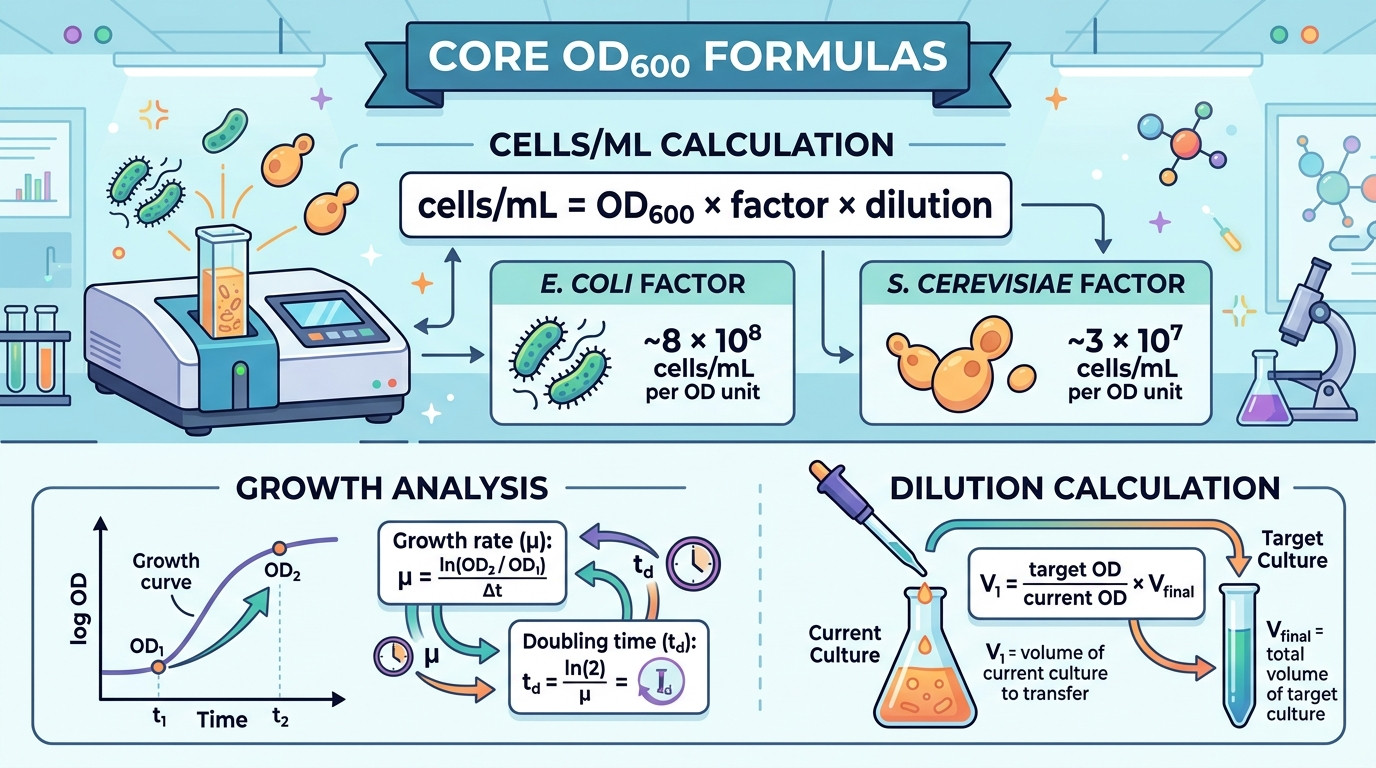
- E. coli: OD600 1.0 ≈ 8 × 10⁸ cells/mL (lab strain, 1 cm path)
- S. cerevisiae: OD600 1.0 ≈ 3 × 10⁷ cells/mL (yeast is larger)
- Linear range: OD600 0.1–0.4 (dilute above 0.4 for accuracy)
- Growth rate: µ = ln(OD₂/OD₁) / (t₂ − t₁); doubling time = ln(2)/µ
- Beer-Lambert: A = εlc (OD is absorbance in a 1 cm cuvette)
📋 Table of Contents
▼
- What an OD600 Calculator Does
- OD600 Calculator — Five Modes
- How OD600 Measurements Work
- Real Scenarios Where OD600 Math Mattered
- Common OD600 Mistakes
- Lab Safety Essentials
- Which Mode Fits Your Situation
- Frequently Asked Questions
- OD600 Best Practices Checklist
- Trusted Reference Resources
- User Reviews & Ratings
What an OD600 Calculator Does
An OD600 calculator converts the number displayed on a spectrophotometer — the optical density at 600 nm — into the practical quantities microbiologists actually need: cells per millilitre, colony-forming units, dilution volumes, and growth rates. OD600 (also written as OD₆₀₀, A₆₀₀, or absorbance at 600 nm) is the standard method for estimating bacterial and yeast cell density in liquid culture. The reading itself is dimensionless (it is a ratio of transmitted to incident light), but when multiplied by an organism-specific conversion factor, it gives an estimate of cell concentration in cells/mL. The OD600 calculator performs this conversion and extends it to the practical calculations that surround every OD600 measurement: diluting a dense culture, inoculating a new culture, and computing growth kinetics.
The reason OD600 calculations trip people up is that the conversion factor between OD and cell count depends on the organism, the spectrophotometer, the cuvette, and whether the reading is in the linear range. For E. coli, OD600 1.0 typically corresponds to approximately 8 × 10⁸ cells/mL — but this number can vary from 5 × 10⁸ to 1 × 10⁹ depending on strain, growth phase, medium, and instrument. For S. cerevisiae (yeast), OD600 1.0 ≈ 3 × 10⁷ cells/mL because yeast cells are much larger. And for OD readings above 0.4, the relationship between OD and cell count becomes non-linear due to multiple scattering, requiring dilution before measurement. The OD600 calculator handles all of these complications by accepting user-specified conversion factors and flagging when readings are outside the linear range.
This OD600 calculator handles five modes: cell density estimation (convert OD600 to cells/mL using a customisable conversion factor), dilution calculator (calculate volumes to dilute a culture to a target OD), back-dilution calculator (calculate the volume of culture to add to fresh medium for a target starting OD), growth rate calculator (compute specific growth rate µ and doubling time from two OD readings at different times), and CFU/mL estimator (estimate colony-forming units from OD, accounting for viability). Each mode shows every step of the working, making it suitable for laboratory notebooks, SOPs, teaching, and regulatory documentation.
OD600 Calculator
Five modes — cell density, dilution, back-dilution, growth rate & CFU estimator
Calculation Result
⚠️ Note: OD600-to-cell-count conversion factors vary by organism, strain, growth phase, medium, and spectrophotometer. The default values are estimates for common lab strains. Calibrate your own factor using plate counts or a counting chamber for accurate results.
How OD600 Measurements Work
OD600 (optical density at 600 nm) is the standard method for estimating microbial cell density in liquid culture. A spectrophotometer passes a beam of 600 nm light through a cuvette containing the culture, and the instrument measures how much light is transmitted versus how much is scattered by the cells. The result is reported as absorbance (A) or optical density (OD), calculated as OD = −log₁₀(I/I₀), where I is the transmitted light intensity and I₀ is the incident light intensity. Higher cell density = more light scattering = higher OD reading.
Why 600 nm?
The wavelength 600 nm is chosen because most bacteria and yeast are transparent at this wavelength — they do not absorb 600 nm light, only scatter it. This means the OD reading reflects cell density (number and size of cells) rather than the chemical composition of the cells. At shorter wavelengths (260 nm, 280 nm), nucleic acids and proteins absorb strongly, which would confound the cell density measurement. At longer wavelengths, water absorption increases. 600 nm is the sweet spot where scattering dominates and absorption is negligible for most microorganisms.
The Conversion Factor
The relationship between OD600 and cell count is empirical — it must be calibrated for each organism, strain, and spectrophotometer. The most commonly cited values are: E. coli: OD600 1.0 ≈ 8 × 10⁸ cells/mL (range 5 × 10⁸ to 1 × 10⁹ depending on strain and conditions), S. cerevisiae: OD600 1.0 ≈ 3 × 10⁷ cells/mL (yeast cells are 5–10 µm, much larger than E. coli at 1–2 µm), and Bacillus spp.: OD600 1.0 ≈ 5 × 10⁸ cells/mL (rod-shaped, similar size to E. coli but variable). The OD600 calculator uses these default factors but allows you to enter a custom factor for your specific system.
The Linear Range
The Beer-Lambert law (A = εlc) predicts a linear relationship between absorbance and concentration — but this linearity only holds at low optical densities. Above OD600 ≈ 0.4, multiple scattering events (a photon being scattered by one cell, then scattered again by another) cause the OD reading to underestimate the true cell density. Above OD600 ≈ 1.0, the underestimation becomes severe. The practical solution: dilute any sample with OD > 0.4 in medium or saline, measure the diluted sample, and multiply by the dilution factor. The OD600 calculator flags when readings are outside the linear range and reminds you to dilute.
Growth Rate and Doubling Time
During exponential (log) phase growth, the cell population doubles at regular intervals. The specific growth rate (µ) is: µ = ln(OD₂/OD₁) / (t₂ − t₁), and the doubling time is: td = ln(2) / µ. For E. coli in rich medium at 37°C, td ≈ 20 minutes (µ ≈ 2.1 h⁻¹). For S. cerevisiae in YPD at 30°C, td ≈ 90 minutes (µ ≈ 0.46 h⁻¹). The OD600 calculator’s Growth Rate mode computes µ and td from any two OD readings taken during exponential phase.
S. cerevisiae factor: ~3 × 10⁷ cells/mL per OD unit
Growth rate: µ = ln(OD₂/OD₁) / Δt
Doubling time: td = ln(2) / µ
Dilution: V₁ = (target OD / current OD) × Vfinal
Quick Reference Values
Remember: OD600 measures light scattering, not absorbance. The conversion to cells/mL is empirical and organism-specific. Always calibrate your own factor using plate counts or a hemocytometer. Dilute samples above OD 0.4 for accurate readings. The OD600 calculator handles dilution factors and flags non-linear readings.
Real Scenarios Where OD600 Math Mattered
Scenario 1: IPTG Induction at Wrong Cell Density
A graduate student induced protein expression with IPTG at OD600 = 1.2 instead of the protocol-specified OD600 = 0.6. Using the OD600 calculator: at OD 1.2, E. coli density ≈ 9.6 × 10⁸ cells/mL — already approaching stationary phase where induction efficiency drops by 50–80%. At OD 0.6 (≈ 4.8 × 10⁸ cells/mL), cells are in mid-log phase with maximum metabolic activity. The late induction produced only 20% of the expected protein yield because the cells had already begun to slow down. The OD600 calculator’s density estimation would have flagged that OD 1.2 is outside the linear range and well past mid-log phase.
Scenario 2: Back-Dilution for Reproducible Growth Curves
A microbiologist needed to start three replicate cultures at exactly OD600 = 0.05 from an overnight culture at OD600 = 3.8. Using the OD600 calculator’s Back-Dilution mode: inoculum volume = (0.05/3.8) × 50 mL = 0.658 mL = 658 µL per flask of 50 mL medium. Without the calculator, the researcher had been adding “1 mL” of overnight to each flask, giving inconsistent starting densities between replicates (OD 0.076 instead of 0.05 — a 52% overestimate that skewed growth curve timing).
Scenario 3: Competent Cell Preparation at Exact OD
A molecular biologist prepared chemically competent E. coli, which requires harvesting cells at OD600 = 0.35–0.40 (early log phase, maximum competence). The culture reached OD600 = 0.38 in 2.5 hours. Using the OD600 calculator: cells/mL = 0.38 × 8 × 10⁸ = 3.04 × 10⁸. The calculator confirmed the reading was within the linear range and within the target window. Missing this window by even 15 minutes (at a 20-minute doubling time) would have pushed the OD to 0.57, reducing transformation efficiency by 5–10×.
Scenario 4: Growth Rate Comparison — Wild Type vs Mutant
A researcher compared the growth rates of wild-type and mutant E. coli strains. Wild type: OD 0.1 at t=0, OD 0.8 at t=3h. Mutant: OD 0.1 at t=0, OD 0.4 at t=3h. Using the OD600 calculator’s Growth Rate mode: wild type µ = ln(0.8/0.1)/3 = 0.693 h⁻¹, td = 60 min. Mutant µ = ln(0.4/0.1)/3 = 0.462 h⁻¹, td = 90 min. The mutant grows 50% slower — quantifying the fitness cost of the mutation. The calculator showed every step, making the comparison auditable for publication.
Scenario 5: Yeast OD to Cell Count for Hemocytometer Verification
A yeast biologist measured OD600 = 0.8 and wanted to verify against a hemocytometer count. Using the OD600 calculator: estimated cells/mL = 0.8 × 3 × 10⁷ = 2.4 × 10⁷. The hemocytometer count gave 2.1 × 10⁷ cells/mL — within 14% of the OD estimate, confirming the conversion factor was reasonable for this strain. The difference is expected because the hemocytometer counts all cells (live + dead) while OD also detects dead cells.
Scenario 6: Dilution for Plating — Serial Dilution from OD
A microbiologist needed to plate a culture at OD600 = 0.5 to obtain 30–300 colonies per plate. Using the OD600 calculator: estimated cells/mL = 0.5 × 8 × 10⁸ = 4 × 10⁸. For 100 µL plating: cells per plate at undiluted = 4 × 10⁷ (far too many). Need approximately 200 colonies → 200/0.1 mL = 2000 cells/mL → dilution factor = 4 × 10⁸ / 2000 = 200,000× → plate the 10⁻⁵ and 10⁻⁶ dilutions. The calculator’s density estimation provided the starting point for the serial dilution scheme.
Scenario 7: Fermentation Process Control — OD Monitoring
A bioprocess engineer monitored an E. coli fermentation for recombinant protein production. The protocol specified IPTG induction at OD600 = 0.6 and harvest at OD600 = 4.0. Online OD monitoring showed OD reaching 0.6 at 4.2 hours. Using the OD600 calculator’s Growth Rate mode: µ = ln(0.6/0.05)/4.2 = 0.591 h⁻¹, td = 70 min (slower than optimal 20 min due to scale-up mixing limitations). Predicted time to OD 4.0: t = ln(4.0/0.6)/0.591 = 3.2 additional hours → harvest at 7.4 hours. The calculator informed the production schedule.
Scenario 8: Antibiotic MIC Determination — Starting Inoculum
A clinical microbiologist prepared a bacterial inoculum for minimum inhibitory concentration (MIC) testing. CLSI guidelines specify a starting inoculum of 5 × 10⁵ CFU/mL. Using the OD600 calculator: a 0.5 McFarland standard ≈ OD625 0.08–0.13 ≈ 1.5 × 10⁸ CFU/mL. Dilution to 5 × 10⁵: factor = 1.5 × 10⁸ / 5 × 10⁵ = 300×. Dilute 1:300 (10 µL into 2990 µL broth). The calculator verified the cell density and dilution arithmetic, ensuring the MIC result was within CLSI acceptable inoculum range.

Common OD600 Mistakes
Mistake 1: Reading Above the Linear Range Without Diluting
The single most common OD600 error. At OD > 0.4, the relationship between OD and cell count becomes non-linear due to multiple scattering. An OD reading of 2.0 does NOT mean twice as many cells as OD 1.0 — it typically means only 1.5–1.7×. Always dilute samples above OD 0.4 (e.g., 1:10 dilution), read the diluted sample, and multiply by the dilution factor. The OD600 calculator flags readings above 0.4 with a warning.
Mistake 2: Using the Wrong Conversion Factor
The E. coli factor (8 × 10⁸) does not apply to yeast (3 × 10⁷) — a 27× difference. Larger cells scatter more light per cell, so fewer cells are needed to produce the same OD. The OD600 calculator provides organism-specific defaults and allows custom factors for any organism.
Mistake 3: Not Blanking the Spectrophotometer
The spectrophotometer must be blanked (zeroed) with uninoculated medium before reading cultures. If you blank with water and your medium has colour or turbidity (like LB or YPD), the medium’s absorbance is added to the cell scattering, giving a falsely high OD. The OD600 calculator cannot correct for this — proper blanking technique is essential.
Mistake 4: Confusing OD600 with Absorbance at Other Wavelengths
OD600 specifically measures light scattering at 600 nm. OD260 (DNA), OD280 (protein), and OD540 (some colorimetric assays) measure fundamentally different things. The cell density conversion factors only apply to readings at 600 nm. The OD600 calculator is specifically for 600 nm readings.
Mistake 5: Assuming OD600 Measures Only Live Cells
OD600 measures all cells — live and dead. A culture that has been killed by antibiotics, UV, or heat treatment may still have a high OD600 because the dead cells still scatter light. To count only viable cells, use plate counts (CFU), live/dead staining, or flow cytometry. The OD600 calculator’s CFU mode includes a viability correction for this reason.
Mistake 6: Not Accounting for Growth Phase
The conversion factor between OD and cell count can change with growth phase. In lag phase, cells are larger (pre-division swelling) and scatter more light per cell. In stationary phase, cell size decreases and some cells may lyse. The standard conversion factors are calibrated for exponential (log) phase cultures. Using them for stationary phase cultures may overestimate cell count by 20–50%.
Mistake 7: Using Growth Rate from Non-Exponential Data
The growth rate formula µ = ln(OD₂/OD₁)/Δt is only valid during exponential phase — when the plot of ln(OD) vs time is linear. Using OD readings from lag phase (before exponential growth starts) or stationary phase (after growth plateaus) gives artificially low growth rates. The OD600 calculator’s Growth Rate mode warns when readings are outside the typical exponential range.
💡 Rule of Thumb: Always dilute to OD < 0.4 before reading. Always blank with uninoculated medium. Always use the correct organism-specific factor. The OD600 calculator handles the arithmetic; your job is the technique.
Lab Safety Essentials
Biosafety: Bacterial and yeast cultures are biohazardous. Handle all cultures using aseptic technique in a biosafety cabinet (BSL-1 or BSL-2 as appropriate). Decontaminate cuvettes and waste with 10% bleach or autoclave. Never mouth-pipette. Wear gloves, lab coat, and eye protection.
- Blank correctly — use uninoculated medium, not water, as the blank.
- Dilute above OD 0.4 — for accurate readings within the linear range.
- Use matched cuvettes — plastic for routine, quartz only if needed for UV.
- Read immediately — cells settle in the cuvette; mix gently and read within seconds.
- Decontaminate — soak cuvettes in 10% bleach for 30 minutes after use.
- Document the reading — record OD, dilution factor, time, and temperature in your lab notebook.
- Calibrate your factor — verify the OD-to-cell-count conversion for your specific organism, strain, and instrument using plate counts.
Which Mode Fits Your Situation
| Mode | Use Case | Key Formula | Inputs | Applications |
|---|---|---|---|---|
| Cells/mL | Estimate cell density | OD × factor × dil | OD, organism, dilution | General cell counting |
| Dilute | Dilute to target OD | C₁V₁ = C₂V₂ | Current OD, target OD, volume | Standardising inocula |
| Back-Dilute | Inoculate fresh culture | V = (target/overnight) × V | Overnight OD, target OD, volume | Growth curves, induction |
| Growth Rate | µ and doubling time | µ = ln(OD₂/OD₁)/Δt | Two OD readings + times | Kinetics, strain comparison |
| CFU/mL | Viable cell estimate | cells × viability% | OD, factor, viability | MIC testing, QC |
OD600 in Molecular Biology
Molecular biologists use OD600 to time critical steps in cloning, protein expression, and transformation protocols. Competent cell preparation requires harvesting at OD600 = 0.35–0.40 (early log phase). IPTG induction of recombinant protein expression is typically performed at OD600 = 0.4–0.6 (mid-log phase). Phage infection for phage display requires a specific multiplicity of infection (MOI), calculated from the cell density at the time of infection. The OD600 calculator’s density estimation and back-dilution modes support all of these applications.
OD600 in Fermentation and Bioprocessing
Bioprocess engineers use OD600 (or online turbidity probes calibrated to OD600) to monitor fermentation progress in real time. Growth rate calculations inform feeding strategies (fed-batch), induction timing, and harvest decisions. The OD600 calculator’s Growth Rate mode computes µ and doubling time from any two time points, supporting process optimisation and scale-up.
OD600 in Clinical Microbiology
Clinical microbiologists use OD600 (or McFarland standards, which are calibrated to OD) to standardise bacterial inocula for antimicrobial susceptibility testing (AST). CLSI and EUCAST guidelines specify inoculum densities in CFU/mL, which are estimated from OD readings. The OD600 calculator’s CFU mode bridges between OD readings and the CFU/mL values required by these standards.
OD600 in Yeast Biology
Yeast biologists use OD600 with a different conversion factor (≈ 3 × 10⁷ cells/mL per OD unit for S. cerevisiae) because yeast cells are much larger than bacteria. OD600 is used to monitor growth in liquid YPD or synthetic medium, to time galactose induction of GAL promoter-driven expression, and to standardise mating type crosses. The OD600 calculator supports yeast with a dedicated conversion factor.
Worked Examples
Example 1 — Cell density: OD600 = 0.5, E. coli, undiluted. Cells/mL = 0.5 × 8 × 10⁸ × 1 = 4 × 10⁸.
Example 2 — Dilution: Current OD = 2.0, target OD = 0.1, final volume = 50 mL. Culture = (0.1/2.0) × 50 = 2.5 mL. Medium = 47.5 mL.
Example 3 — Back-dilution: Overnight OD = 4.0, target = 0.05, volume = 100 mL. Inoculum = (0.05/4.0) × 100 = 1.25 mL.
Example 4 — Growth rate: OD₁ = 0.1 at t=0h, OD₂ = 0.8 at t=3h. µ = ln(8)/3 = 0.693 h⁻¹. td = 0.693/0.693 = 1.0 hour = 60 minutes.
Example 5 — CFU: OD = 0.5, factor = 8 × 10⁸, viability = 90%. CFU/mL = 0.5 × 8 × 10⁸ × 0.9 = 3.6 × 10⁸.
Frequently Asked Questions
1. What is an OD600 calculator?
An OD600 calculator converts spectrophotometer readings at 600 nm into cell counts, dilution volumes, and growth parameters. This calculator provides five modes: cell density, dilution, back-dilution, growth rate, and CFU estimation.
2. What does OD600 of 1.0 mean?
OD600 1.0 means the culture scatters 90% of the incident 600 nm light (transmittance = 10%). For E. coli, this corresponds to approximately 8 × 10⁸ cells/mL. For yeast, approximately 3 × 10⁷ cells/mL. The exact value depends on organism, strain, and spectrophotometer.
3. What is the linear range for OD600?
OD600 0.1–0.4 is generally linear (OD proportional to cell density). Above 0.4, multiple scattering causes underestimation. Always dilute samples above OD 0.4 for accurate readings.
4. How do I calculate doubling time from OD?
µ = ln(OD₂/OD₁) / (t₂ − t₁). Doubling time = ln(2) / µ. Both OD readings must be from exponential phase (the linear portion of a ln(OD) vs time plot). The OD600 calculator’s Growth Rate mode computes this automatically.
5. Why is the conversion factor different for yeast?
Yeast cells (S. cerevisiae, 5–10 µm) are much larger than bacteria (E. coli, 1–2 µm). Larger cells scatter more light per cell, so fewer yeast cells are needed to produce the same OD reading. Hence the factor is ~3 × 10⁷ vs ~8 × 10⁸ for E. coli.
6. Does OD600 measure live or dead cells?
Both. OD600 measures light scattering by all cells regardless of viability. Dead cells still scatter light. For viable cell counts, use plate counts (CFU) or live/dead staining. The OD600 calculator’s CFU mode includes a viability correction factor.
7. What OD600 should I induce protein expression?
Typically OD600 = 0.4–0.6 (mid-log phase) for E. coli IPTG induction. At this density, cells are actively dividing with maximum metabolic capacity for protein production. Inducing too early wastes time; too late (stationary phase) reduces yield.
8. How do I back-dilute an overnight culture?
Inoculum volume = (target OD / overnight OD) × final volume. For OD 0.05 from an overnight at OD 4.0 in 100 mL: (0.05/4.0) × 100 = 1.25 mL. Add 1.25 mL overnight to 98.75 mL fresh medium.
9. What is a McFarland standard?
McFarland standards are barium sulphate turbidity standards used in clinical microbiology. A 0.5 McFarland standard corresponds to approximately 1.5 × 10⁸ CFU/mL and OD625 ≈ 0.08–0.13. They provide a visual comparison for standardising inocula without a spectrophotometer.
10. Is this OD600 calculator free?
Yes. Completely free, browser-based, no sign-up, fully private. No data sent to any server. Reviews are saved in your browser only.
OD600 Best Practices Checklist
Before Reading
During Reading
After Reading

Trusted Reference Resources
Molecular Cloning (Sambrook & Russell) — The definitive laboratory manual with OD600 protocols, growth curve methods, and competent cell preparation.
CLSI M07 & M100 — clsi.org — Clinical Laboratory Standards Institute guidelines for antimicrobial susceptibility testing, including inoculum standardisation by OD/McFarland.
Current Protocols in Molecular Biology — Detailed OD600 measurement protocols, growth rate calculations, and troubleshooting guides.
ASM (American Society for Microbiology) — asm.org — Resources on microbial growth kinetics, spectrophotometry, and cell counting methods.
Agilent/Molecular Devices Application Notes — Spectrophotometer manufacturer guides on OD600 measurement, linearity, and calibration.
User Reviews & Ratings
Share Your Experience with This OD600 Calculator
Final Thoughts on OD600 Calculation
OD600 is the most frequently measured parameter in microbiology — and the most frequently misinterpreted. The reading itself is just a number on a spectrophotometer, but converting it into cells/mL, computing dilution volumes, calculating growth rates, and estimating CFU requires arithmetic that is easy to get wrong, especially when dilution factors, organism-specific conversion factors, and the non-linearity above OD 0.4 are all in play. An OD600 of 2.0 does not mean twice as many cells as OD 1.0. A back-dilution of “1 mL overnight into 50 mL” gives OD 0.08 if the overnight is OD 4.0, but OD 0.12 if the overnight is OD 6.0 — a 50% difference from a seemingly identical protocol.
The OD600 calculator eliminates these errors by performing every conversion with organism-specific factors, handling dilution arithmetic, computing growth kinetics, and flagging readings outside the linear range. The step-by-step output documents every calculation for laboratory notebooks, SOPs, and publications. Use it for every OD600 reading, every inoculation, every growth curve, and every MIC determination — and calibrate your own conversion factor periodically with plate counts to ensure your results are quantitatively meaningful.
🔒 Privacy Guarantee: Every calculation runs entirely within your browser. No data is sent to any server. Reviews are saved in your browser’s local storage only.
Pingback: Cell Seeding Calculator – Calculate Cell Seeding Density Fast
Pingback: Cell Doubling Time Calculator – Calculate Cell Growth Instantly
Pingback: Ratio Dilution Calculator - Convert 1:10, 1:32 to Volumes | Free
Pingback: Pharmaceutical Dilution Calculator - IV & Pediatric Dosing | Free
Pingback: How to Calculate the Dilution Factor: 7 Simple Steps to Success
Pingback: Weight by Volume Dilution Calculator (W/V %) – Free Lab Tool
Pingback: Serial Dilution Calculation Table – Step-by-Step Guide & Free Calculator
Pingback: How to Calculate Dilution Factor: 5 Steps to Flawless Results
Pingback: How to Do a Dilution Calculation – Step-by-Step Guide & Free Calculator
Pingback: Mixing Ratio Calculator: Exact Volumes for Any Ratio (Free Tool)
Pingback: MIC Dilution Calculator | Calculate MIC Dilutions Instantly
Pingback: ABV Calculator – Calculate Alcohol by Volume Instantly
Pingback: Antibiotic Dose Calculator | Calculate Accurate Dosages