
🧪 Pool Calcium Hardness Calculator
Calculate calcium hardness adjustments, water replacement, calcium saturation index & complete CH analysis
⚠️ Calcium Hardness Safety Note
CALCIUM HARDNESS AFFECTS POOL SURFACES AND EQUIPMENT. Low CH (<200 ppm) causes corrosive water that etches plaster, damages grout, and corrodes metal equipment. High CH (>400 ppm) causes scaling on surfaces, cloudy water, and clogged filters. Calcium hardness can only be reduced by draining and replacing water — it cannot be removed chemically. Add calcium chloride slowly with the pump running. Pre-dissolve in a bucket of pool water first to prevent clumping. Wait 24 hours before retesting. For vinyl liner pools, maintain CH at 150-250 ppm. For plaster/concrete pools, maintain CH at 200-400 ppm.
Calculation History
💡 You Might Also Like
Pool Calcium Hardness Calculator: Raise CH, Lower CH, Calcium Saturation Index & Complete CH Analysis
A pool calcium hardness calculator is an essential tool that helps pool owners accurately calculate how much calcium chloride to add to raise calcium hardness (CH) to the ideal 200-400 ppm range for plaster pools (150-250 ppm for vinyl), how much water to drain and replace to reduce high CH (which can only be lowered by water replacement — not chemically), the Calcium Saturation Index (CSI) to determine if water is balanced, corrosive, or scaling, and complete CH analysis with pH, alkalinity, and temperature assessment. Whether you’re adding calcium chloride to a new plaster pool, reducing CH that has built up from fill water, determining if your water is corrosive or scaling, or getting a complete calcium management plan, this pool calcium hardness calculator provides precise calculations with step-by-step explanations for optimal pool surface protection.
CALCIUM HARDNESS AFFECTS POOL SURFACES AND EQUIPMENT. Low CH (<200 ppm) causes corrosive water that etches plaster, damages grout, corrodes metal equipment, and causes eye/skin irritation. High CH (>400 ppm) causes scaling on surfaces, cloudy water, clogged filters, and reduced heater efficiency. Calcium hardness can only be reduced by draining and replacing water — it cannot be removed chemically. Add calcium chloride slowly with the pump running. Pre-dissolve in a bucket of pool water first to prevent clumping on pool surfaces. Wait 24 hours before retesting. For vinyl liner pools, maintain CH at 150-250 ppm. For plaster/concrete pools, maintain CH at 200-400 ppm. Always test CH monthly during swim season.
📋 Table of Contents
▼What a Pool Calcium Hardness Calculator Does
A pool calcium hardness calculator is a specialized tool that performs essential calculations for calcium hardness (CH) management in swimming pools, including calculating how much calcium chloride (77%, 94%, or liquid 32%) to add to raise CH to the ideal range (200-400 ppm for plaster pools, 150-250 ppm for vinyl pools), determining how much water to drain and replace to reduce high CH (the only way to lower CH), calculating the Calcium Saturation Index (CSI) to determine if water is balanced, corrosive, or scaling, and generating complete CH analysis with pH, alkalinity, and temperature assessment. According to the Centers for Disease Control and Prevention (CDC), maintaining proper calcium hardness is critical for protecting pool surfaces, equipment, and swimmer comfort.
A pool calcium hardness calculator tells you exactly how many ounces of calcium chloride to add to raise CH from 100 to 300 ppm in your 20,000-gallon plaster pool, how many gallons of water to drain and replace to reduce CH from 600 to 300 ppm, whether your water is corrosive (will etch plaster) or scaling (will deposit calcium) based on the CSI, and the complete CH action plan based on your pool’s current chemistry. Unlike generic pool calculators, a pool calcium hardness calculator understands the unique properties of calcium — that it can only be lowered by water replacement, that it interacts with pH, alkalinity, and temperature to determine water balance, and that different pool surfaces (plaster vs. vinyl) require different CH ranges. Every pool owner, CPO, and pool service technician who manages plaster or concrete pools relies on these calculations, and the pool calcium hardness calculator exists to make them fast, accurate, and educational.
The reason calcium hardness calculations trip people up is the relationship between CH and water balance. CH doesn’t exist in isolation — it interacts with pH, alkalinity, and temperature to determine whether water is balanced, corrosive, or scaling. A pool with 250 ppm CH can be perfectly balanced or corrosive depending on pH and alkalinity. The pool calcium hardness calculator handles this relationship internally through the CSI calculation, showing you whether your water is actually balanced for your specific conditions.
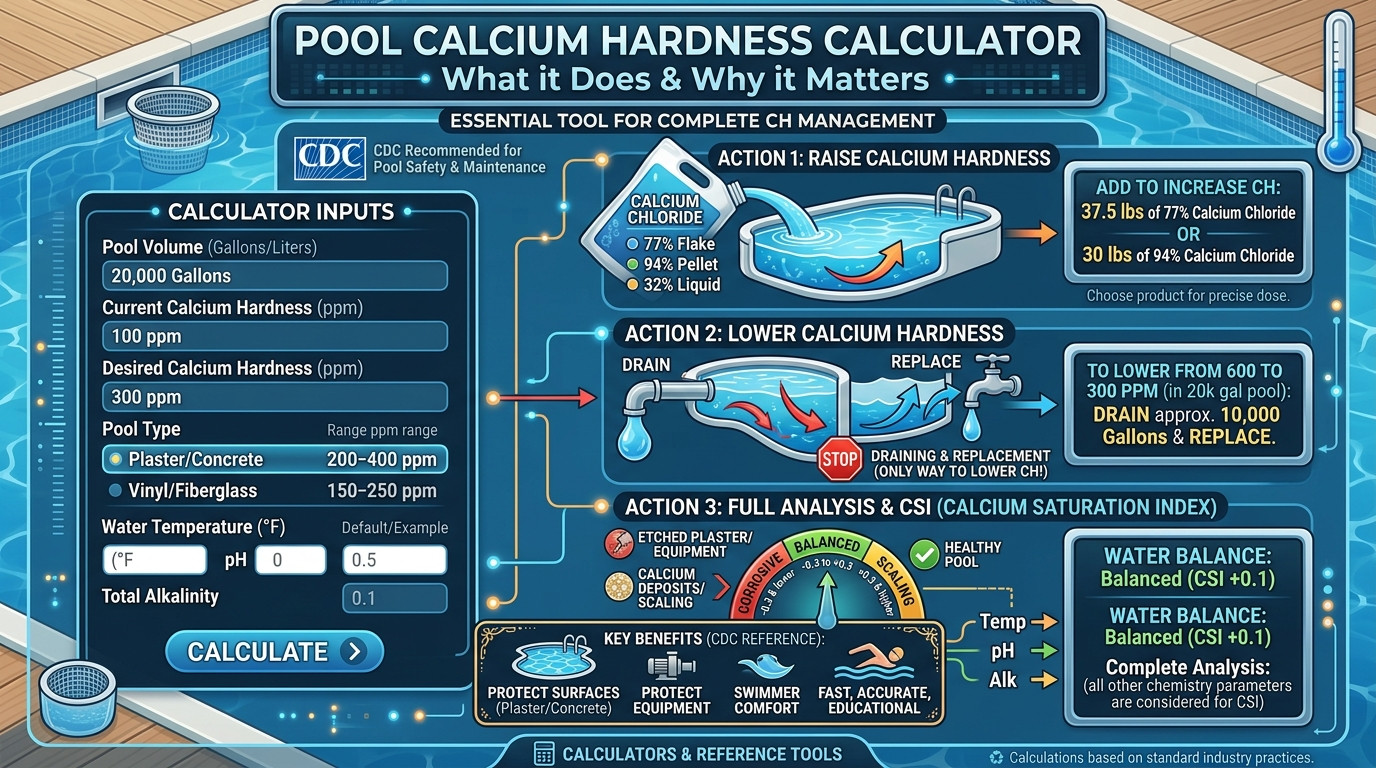
This pool calcium hardness calculator handles the four most important CH management tasks in one place: raise CH (calcium chloride dosing for 77% flake, 94% pellet, or 32% liquid), lower CH (water replacement calculations — the only way to reduce CH), calcium saturation index (CSI calculation to determine if water is balanced, corrosive, or scaling), and complete CH analysis (evaluating CH, pH, TA, and temperature with prioritized action recommendations). Each mode shows the answer and every step of the working, so you can verify the reasoning, learn the chemistry, or document the calculation for your pool maintenance records.
Whether you are a new plaster pool owner adding calcium for the first time, a pool service technician managing CH buildup from hard fill water, a commercial pool operator dealing with scaling from high CH, or a DIY pool owner trying to understand why their plaster is etching despite “good” chemistry readings, the pool calcium hardness calculator gives you the exact calculations every time—no guesswork, no over-dosing, no surface damage, no scaling.
How Calcium Hardness Calculations Work
Every calcium hardness calculation comes down to one core principle: calcium hardness must be maintained in the ideal range to protect pool surfaces and equipment while keeping water balanced. From that principle, a handful of formulas cover almost every CH management task. The pool calcium hardness calculator exists to handle these formulas reliably and transparently, because CH management is one of the most important — and most misunderstood — aspects of pool chemistry.
Raising CH: Calcium Chloride Dosing
When CH is below 200 ppm in a plaster pool (or below 150 ppm in a vinyl pool), the water becomes corrosive and will etch plaster, damage grout, and corrode metal equipment. The pool calcium hardness calculator uses product-specific dosing rates: Calcium Chloride 77% (flake) requires approximately 1.2 oz per 1,000 gallons per 10 ppm increase; Calcium Chloride 94% (pellet) requires approximately 1.0 oz per 1,000 gallons per 10 ppm increase; Liquid Calcium Chloride 32% requires approximately 3.8 fl oz per 1,000 gallons per 10 ppm increase. For a 20,000-gallon pool going from 100 to 300 ppm with 77% flake: (20,000 / 1,000) × (200 / 10) × 1.2 = 48 oz (3 lbs).
CH increase = desired CH increase in ppm
1.2 = oz of 77% calcium chloride flake per 1,000 gal per 10 ppm
Pre-dissolve in bucket of pool water. Add slowly with pump running. Retest after 24 hours.
Lowering CH: Water Replacement (The Only Method)
Calcium hardness cannot be reduced chemically — no product, sequestrant, or treatment can remove calcium from pool water. The only way to lower CH is by draining pool water and replacing it with fresh water (which has lower CH). The pool calcium hardness calculator uses: Volume to drain = Pool Volume × (Current CH – Target CH) / (Current CH – Source CH). For a 20,000-gallon pool going from 600 to 300 ppm with source water at 100 ppm: 20,000 × (600 – 300) / (600 – 100) = 12,000 gallons (60% of the pool).
Calcium Saturation Index (CSI): Water Balance Assessment
The most important concept in calcium hardness management is the Calcium Saturation Index (CSI), which determines whether water is balanced, corrosive, or scaling. CSI considers CH, pH, alkalinity, temperature, and TDS to calculate a single number: CSI = pH + TF + CF + AF + TDSF – 12.1, where TF is the temperature factor, CF is the calcium factor (log₁₀ of CH), AF is the alkalinity factor (log₁₀ of TA), and TDSF is the TDS factor. CSI between -0.3 and +0.3 indicates balanced water. CSI below -0.3 indicates corrosive water (will etch plaster). CSI above +0.3 indicates scaling water (will deposit calcium).
CH Ranges by Pool Type
Different pool surfaces require different CH ranges. Plaster/concrete pools need 200-400 ppm CH to prevent the water from dissolving calcium from the plaster surface. Vinyl liner pools need only 150-250 ppm CH (too high causes scaling on the liner). Fiberglass pools need 150-250 ppm CH. The pool calcium hardness calculator adjusts recommendations based on pool type, ensuring you maintain the correct range for your specific surface.
Quick Reference Values for the Pool Calcium Hardness Calculator
Remember: The pool calcium hardness calculator provides accurate dosing, but calcium chloride dissolves slowly and can clump if added too quickly. Always pre-dissolve in a bucket of pool water before adding to the pool. Add slowly with the pump running, and do not retest for 24 hours. For large increases (>100 ppm), split the dose into 2-3 additions over several days to prevent cloudiness and scaling.

Real Scenarios Where CH Management Mattered
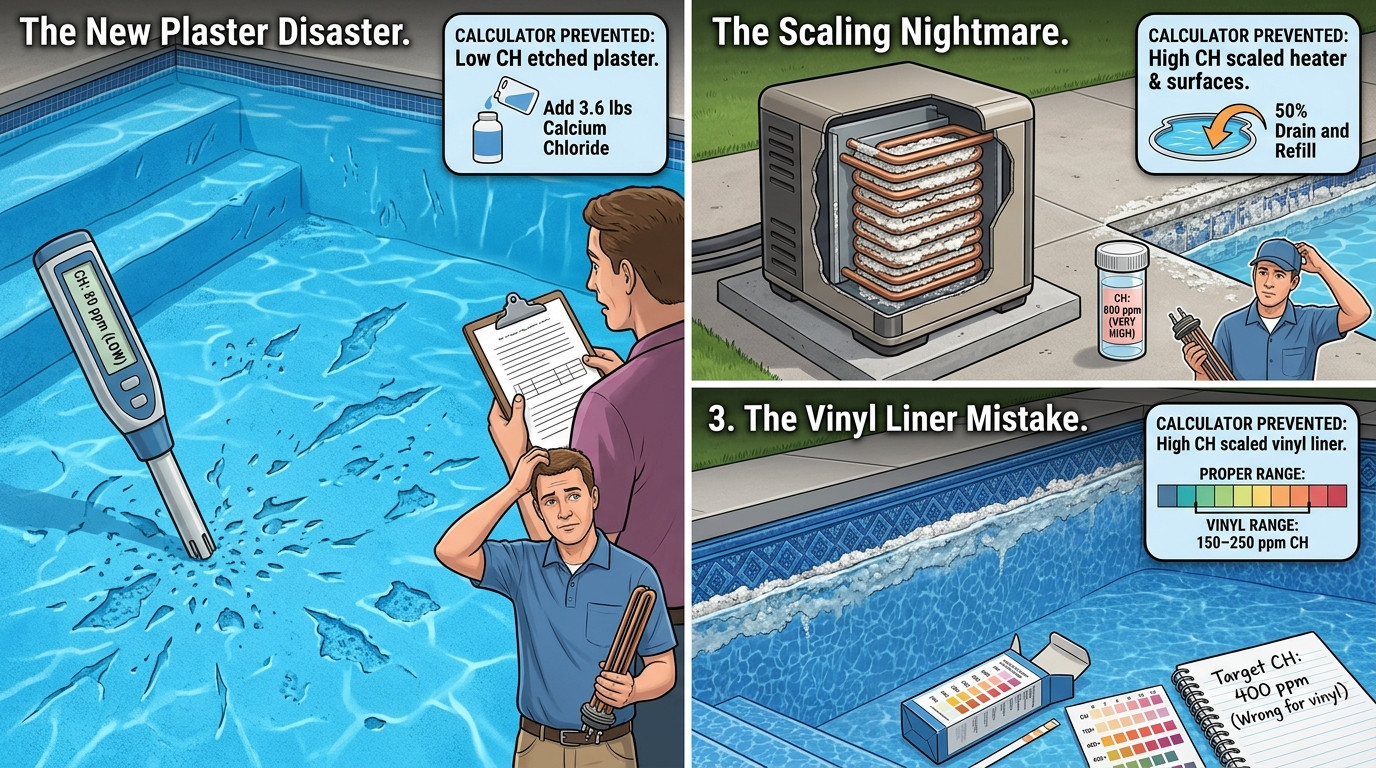
These scenarios reflect real pool maintenance situations where calcium hardness management errors made a tangible difference to pool surfaces, equipment, and cost. Each scenario shows how the pool calcium hardness calculator would have prevented the error.
Scenario 1: The New Plaster Disaster
A new plaster pool owner didn’t add calcium chloride after the plaster cure, assuming the plaster would provide enough calcium. After 3 months, the CH was only 80 ppm — far below the 200 ppm minimum. The corrosive water etched the new plaster surface, creating a rough, pitted texture that required a $5,000 acid wash and replastering in spots. The pool calcium hardness calculator would have shown that 57.6 oz (3.6 lbs) of 77% calcium chloride was needed to raise CH from 0 to 250 ppm in the 24,000-gallon pool — preventing the $5,000 damage.
Scenario 2: The Scaling Nightmare
A pool in an area with hard fill water (CH 400 ppm) had been topped off with fill water for 2 years without any drain and refill. CH built up to 800 ppm. The water became cloudy, calcium scale formed on the tile line and pool surfaces, and the heater became clogged with calcium deposits ($2,000 heater replacement). The pool calcium hardness calculator’s full analysis mode would have flagged the high CH years earlier and recommended a 50% drain and refill when CH reached 500 ppm — preventing the $2,000 heater damage and $1,500 scale removal.
Scenario 3: The Vinyl Liner Mistake
A vinyl liner pool owner maintained CH at 400 ppm (the plaster pool recommendation) for years. The high CH caused calcium scaling on the vinyl liner, creating white deposits that couldn’t be removed without damaging the liner. The liner had to be replaced early ($4,000). The pool calcium hardness calculator’s full analysis mode would have recommended 150-250 ppm CH for vinyl liner pools — preventing the scaling and early liner replacement.
Scenario 4: The CSI Blind Spot
A pool owner tested CH at 250 ppm and assumed everything was fine. But pH was 7.0 and TA was 60 ppm — both low. The CSI was -0.8, indicating highly corrosive water. The corrosive water etched the plaster and corroded the heater’s copper heat exchanger ($1,800 replacement). The pool calcium hardness calculator’s CSI mode would have flagged the corrosive water immediately: “CSI -0.8 — water is corrosive. Raise pH and TA to balance, even though CH is adequate.” This would have prevented the $1,800 damage.
Common Calcium Hardness Mistakes
These are the most frequent CH management errors that the pool calcium hardness calculator helps prevent:
1. Not Testing CH Regularly
Many pool owners test pH and chlorine weekly but never test CH. CH changes slowly (it only increases from fill water additions or calcium chloride dosing), but it accumulates steadily in areas with hard water. Test CH monthly during swim season. The pool calcium hardness calculator requires current CH as input — this forces you to test before making adjustments.
2. Using Plaster CH Ranges for Vinyl Pools
Plaster pools need 200-400 ppm CH. Vinyl liner pools need only 150-250 ppm CH. Maintaining plaster-level CH in a vinyl pool causes scaling on the liner that can’t be removed without damage. The pool calcium hardness calculator’s full analysis mode adjusts recommendations based on pool type.
3. Adding Calcium Chloride Too Quickly
Dumping calcium chloride directly into the pool causes it to sink and clump on the pool floor, creating hard white deposits that are difficult to remove. Always pre-dissolve in a bucket of pool water first, then add slowly with the pump running. The pool calcium hardness calculator includes this instruction with every calculation.
4. Ignoring the CSI
CH doesn’t exist in isolation — it interacts with pH, alkalinity, and temperature to determine water balance. A pool with 250 ppm CH can be perfectly balanced or corrosive depending on pH and TA. The pool calcium hardness calculator’s CSI mode evaluates all four parameters and flags when water is corrosive or scaling — preventing surface damage.
5. Trying to Lower CH Chemically
No product can remove calcium from pool water. Products claiming to “reduce CH” or “sequester calcium” only temporarily prevent scaling — they don’t remove the calcium. The only way to lower CH is by draining and replacing water. The pool calcium hardness calculator’s lower mode calculates the exact volume to drain — saving you from wasting money on ineffective products.
Warning: When CH exceeds 500 ppm, the only practical solution is partial drain and refill. The cost of water replacement ($50-200 depending on pool size and local water rates) is far less than the cost of scaling damage to heaters, filters, and pool surfaces. The pool calcium hardness calculator’s lower mode shows the exact volume to drain and the estimated water cost — helping you make the cost-effective decision before damage occurs.
Expert Perspectives on Calcium Hardness
“Calcium hardness is the most neglected parameter in pool maintenance. Pool owners test pH and chlorine weekly but never test CH — until their plaster is etched or their heater is clogged with scale. A pool calcium hardness calculator should be in every pool owner’s toolkit. The CSI calculation alone has saved my clients thousands in surface and equipment damage by catching corrosive or scaling water before damage occurs.”
“In areas with hard fill water, CH buildup is the number one problem I see. Homeowners top off with fill water for years, never realizing CH is creeping up to 600-800 ppm. By the time they notice scaling, the heater is already damaged. A pool calcium hardness calculator would have flagged the problem years earlier and recommended a preventive drain and refill — saving $2,000-5,000 in equipment damage.”
“For commercial pools, CSI management is a legal requirement. Health department inspectors check CSI and require it to be between -0.3 and +0.3. When CSI is out of range, we have to adjust chemistry immediately — or face fines and pool closure. The pool calcium hardness calculator helps us maintain CSI in the balanced range, avoiding violations and keeping pools open.”
Expert Consensus: All three experts agree that calcium hardness management is one of the most important — and most neglected — aspects of pool chemistry. Using a pool calcium hardness calculator to track CH levels, calculate the CSI, and plan water replacements when CH gets too high prevents the most costly pool maintenance problems: plaster etching, heater damage, and scaling.
Frequently Asked Questions
Always retest CH 24 hours after adding calcium chloride to verify the full increase. Calcium chloride dissolves slowly, so testing too soon will show lower-than-actual readings.
The pool calcium hardness calculator provides exact amounts for any pool volume, any target CH increase, and any calcium chloride product (77% flake, 94% pellet, or 32% liquid).
The pool calcium hardness calculator’s lower mode calculates the exact volume to drain for any target CH reduction. Products claiming to “reduce CH” or “sequester calcium” only temporarily prevent scaling — they don’t remove the calcium.
The pool calcium hardness calculator uses these ideal ranges as targets. If your CH is below the ideal range, add calcium chloride. If it’s above, drain and refill to reduce it.
The pool calcium hardness calculator’s CSI mode calculates CSI from CH, pH, TA, temperature, and TDS. It’s the most important number for water balance — more important than any single parameter alone.
The pool calcium hardness calculator’s CSI mode will show if your water is corrosive. To fix it, raise CH, pH, or TA (or all three) until CSI is between -0.3 and +0.3. Existing etching cannot be reversed — only prevented from getting worse.
Retest CH 24 hours after adding calcium chloride to verify the full increase. For large increases (>100 ppm), split the dose into 2-3 additions over several days to prevent cloudiness.
The pool calcium hardness calculator’s full analysis mode tracks CH accumulation and recommends preventive drain and refill when CH approaches 500 ppm — before scaling damage occurs.
Use the pool calcium hardness calculator whenever CH falls outside the ideal range (200-400 ppm plaster, 150-250 ppm vinyl). Keep a CH testing log to track accumulation rates from fill water.
The calculator provides the same accurate dosing and water replacement calculations regardless of pool material. For vinyl and fiberglass pools, the ideal CH range is lower (150-250 ppm) than for plaster pools (200-400 ppm).
Calcium Hardness Best Practices
These practices separate effective CH management from surface damage and scaling problems. Follow them alongside the pool calcium hardness calculator for optimal results.
Before Adding Calcium Chloride
During Calcium Chloride Addition
After Calcium Chloride Addition
Trusted Reference Resources
These are authoritative references for calcium hardness management and pool surface chemistry that complement the pool calcium hardness calculator.
CDC Healthy Swimming — cdc.gov/healthywater/swimming — Comprehensive pool safety guidelines, calcium hardness recommendations, and water balance standards from the Centers for Disease Control and Prevention.
Pool & Hot Tub Alliance (PHTA) — phta.org — Industry association for pool professionals, offering education, certification, and best practices for calcium hardness management and CSI calculations.
National Swimming Pool Foundation (NSPF) — nspf.org — Certified Pool Operator (CPO) training, water chemistry education, and calcium hardness management guidelines.
National Plasterers Council (NPC) — npconline.org — Plaster industry standards, startup procedures, and water chemistry guidelines for new plaster pools. Essential reading for new plaster pool owners.
On our platform, related calculation tools that complement the pool calcium hardness calculator include: pool chemistry calculator, pool chemical calculator, pool alkalinity calculator, cyanuric acid calculator, pool volume calculator, pH calculator, PPM calculator, solution dilution calculator, percent concentration calculator, dilution factor calculator, and dilution calculator (all-in-one).
Leave a Review
Used this pool calcium hardness calculator for your pool maintenance? Share your experience below. Your review helps other pool owners decide if this pool calcium hardness calculator fits their maintenance needs. Every review is stored locally on your device and appears instantly.
📝 Share Your Experience
Final Thoughts on the Pool Calcium Hardness Calculator
Calcium hardness is the most neglected parameter in pool maintenance — and the pool calcium hardness calculator exists to fix that neglect. Pool owners test pH and chlorine weekly but never test CH, until their plaster is etched or their heater is clogged with scale. At CH 100 ppm, water is corrosive and will dissolve calcium from plaster surfaces. At CH 600 ppm, water is scaling and will deposit calcium on every surface it touches. The pool calcium hardness calculator shows you the exact CH for your pool type, the CSI for your water balance, and the action plan to keep both in the ideal range — preventing the most costly pool maintenance problems.
What separates well-maintained pools from pools with surface damage and scaling is understanding and tracking. Using the pool calcium hardness calculator for exact calcium chloride dosing, testing CH monthly, calculating the CSI regularly, planning water replacements when CH gets too high, and adjusting pH and TA to maintain balanced water: these are the habits that prevent plaster etching, heater damage, and scaling. The pool calcium hardness calculator does the math perfectly every time, but it cannot test your CH or drain your pool — those remain the pool owner’s responsibilities.
The framework is short: test CH monthly, calculate with the pool calcium hardness calculator, add calcium chloride only when below 200 ppm (plaster) or 150 ppm (vinyl), calculate CSI regularly to verify water balance, and drain to reduce CH when it exceeds 500 ppm. That sequence gives balanced, surface-safe water every time. From new plaster pools and commercial aquatic facilities to residential pools in hard-water areas, accurate calcium hardness management is the foundation of surface protection and equipment longevity, and getting it right with the pool calcium hardness calculator is the most important skill in pool chemistry.
Keep this pool calcium hardness calculator handy as your starting point for every CH task, and use the related dilution and concentration tools in the sidebar whenever you need to plan or verify a calculation before treating your pool.
🔒 Privacy Guarantee: Every calculation on this pool calcium hardness calculator page runs entirely within your browser. No data—pool volumes, CH levels, CSI values, or any other inputs—is sent to any server, stored, or shared. Your calculations are completely private.